
Google Gemini Review 2026: Explore its powerful features, pricing, pros and cons, real-world performance, and Gemini vs ChatGPT comparison. Google Gemini has come a long way since the days of Bard.
I recently used Gemini for a task that would normally require opening several tabs and searching through my email. I asked it to check my emails from the previous week for mentions of “article reviews” and summarize the relevant messages.
There were no dramatic fireworks. Gemini simply took a few seconds, scanned my Gmail inbox, and returned a clean list of useful action items. The task saved me around 15 minutes of manual searching.
And that’s exactly what makes Gemini interesting.
It isn’t only about having another AI chatbot to ask questions. Google’s bigger advantage is connecting AI directly to the tools many people already use every day.
After using Gemini regularly and comparing my experience with feedback from G2 users, I have a much clearer picture of where Gemini performs well, where it still has weaknesses, and who should actually consider using it.
Read More: 15 Best AI Tools in 2026: Free & Paid Tools Worth Trying
So, is Google Gemini worth using in 2026?
Let’s find out.
Google Gemini Review 2026: What Is Google Gemini?
Google Gemini is Google’s family of artificial intelligence models and the AI assistant built around them. It replaced Bard and has evolved into a much broader AI platform.
Gemini can help with tasks such as:
- Writing and editing
- Research
- Summarizing documents
- Coding
- Data analysis
- Image generation
- Video generation
- Brainstorming
- Web searches
- Everyday productivity
One of its biggest advantages is its connection to Google’s ecosystem.
Depending on the plan and features available, Gemini can work alongside products such as Gmail, Google Docs, Drive, Sheets, Slides, Android, and other Google services.
Gemini is also designed to handle multimodal inputs, meaning it can work with different types of information, including text, images, documents, code, and video.
That makes it much more than a traditional chatbot.
How I Tested Google Gemini
This review is based on hands-on use of Google Gemini across both free and paid experiences.
I evaluated Gemini using three main criteria:
1. Output Quality
I looked at how accurate, useful, and practical the responses were without requiring constant corrections.
2. Reasoning Ability
I tested how well Gemini handled multi-step instructions, longer reasoning tasks, and complicated requests.
3. Everyday Usability
I also considered the overall experience, including speed, interface, workflow integration, and how much effort was required to get useful results.
I also compared my personal experience with user feedback from G2 to see whether the strengths and weaknesses I noticed were common among other users.
Note: AI products change quickly. Features, models, limits, and pricing can change over time, so always check Google’s official information before making a purchasing decision.
Google Gemini Review 2026: Key Features
| Feature | What It Does |
| Workspace Integration | Reads and works directly with Gmail, Docs, Sheets, and Drive via @-mentions, without leaving the chat. |
| Massive Context Window | Processes 1M+ tokens — large PDFs, long videos, and notes — with strong needle-in-a-haystack retrieval. |
| Native Multimodality | Understands text, images, audio, and video together (powered by the Gemini 3 series). |
| Image & Video Generation | Nano Banana Pro for image generation and Veo 3.1 for short AI video clips, generated in-chat. |
| Gems & Super Gems | Custom, pre-instructed assistant personas (like custom GPTs); Super Gems add buttons and simple forms. |
| Real-Time Web Search (Grounding) | Ties answers to live Google Search results with inline citations and a fact-check option. |
| Deep Research | Runs multi-step research plans across dozens of sources and compiles a cited report. |
| Deep Think Reasoning | A slower, careful reasoning mode for complex math, logic, and debugging tasks. |
| Agentic Tasks | Gemini Agent and Antigravity can operate a browser, terminal, or code editor to complete tasks. |
Google Gemini Features Worth Knowing
Gemini offers a large collection of features, but some are considerably more useful in everyday work than others.
Here are the features that stand out the most.
1. Google Workspace Integration
For me, this is one of Gemini’s biggest advantages.
If you already use Gmail, Google Drive, Docs, Sheets, or Slides, Gemini can fit naturally into your existing workflow.
Instead of copying information between multiple applications, you can use AI features directly within Google’s ecosystem.
For example, Gemini can help you:
- Summarize emails
- Draft replies
- Rewrite documents
- Analyze information
- Work with files
- Summarize content
- Improve presentations
This can eliminate a lot of repetitive copy-and-paste work.
2. Large Context Window
Gemini can handle very large amounts of information, depending on the model and plan you’re using.
This becomes particularly useful when working with:
- Large PDFs
- Long documents
- Extensive notes
- Videos
- Large datasets
- Multiple pieces of related information
Instead of manually searching through a long document, you can ask Gemini to locate specific information and summarize the relevant sections.
For users who regularly work with large files, this can be a significant productivity advantage.
3. Multimodal Capabilities
Gemini isn’t limited to text.
It can work with different types of inputs, including:
- Text
- Images
- Documents
- Code
- Spreadsheets
- Video
This means you can give Gemini different types of information within the same workflow and ask it to analyze them together.
For example, you can upload an image and ask questions about it, provide a document for summarization, or use a video as the source for specific information.
4. Image Generation
Gemini has also become a serious option for AI image generation.
It can create and edit different types of visuals, including:
- Photorealistic images
- Graphics
- Illustrations
- Marketing visuals
- Presentations
- Concept images
- Infographics
The conversational editing process is particularly useful because you can describe the changes you want rather than manually editing every element.
However, AI-generated images can still have problems with small text, logos, and certain fine details.
For quick ideas and prototypes, though, Gemini can be extremely useful.
5. Video Generation
Google’s Veo technology adds video-generation capabilities to the Gemini ecosystem.
It can create short video clips with visual movement and synchronized audio.
This can be useful for:
- Marketing content
- Social media
- Advertisements
- Creative experiments
- Video concepts
The main limitation is that advanced video generation can consume usage credits quickly, particularly for heavy users.
6. Gems
Gems allow you to create customized versions of Gemini for specific tasks.
For example, you could create a Gem designed to act as:
- A writing assistant
- A translator
- A meal planner
- A coding reviewer
- A content editor
- A research assistant
The advantage is that you don’t have to repeat the same instructions every time you start a new conversation.
7. Real-Time Web Search
Gemini can use Google Search to provide information based on current web results.
This is useful when you’re asking about information that changes frequently.
The system can also provide citations and a way to double-check information.
However, web grounding doesn’t mean every answer is automatically correct. Important information should still be verified.
8. Deep Research
Deep Research is one of Gemini’s more useful features for serious research.
Instead of simply answering a question from a single search result, it can perform a multi-step research process and compile information from multiple sources.
This makes it useful for:
- Market research
- Academic research
- Industry research
- Competitor research
- Long-form reports
- Complex questions
For people who regularly spend time opening dozens of browser tabs, this feature can save considerable time.
Google Gemini for Writing and Editing
Gemini is a capable writing assistant for everyday work.
I’ve used it for tasks such as:
- Emails
- Direct messages
- Blog posts
- Articles
- Marketing copy
- Project documents
- Social media content
Its writing style often feels practical and conversational.
One of the biggest advantages isn’t necessarily the writing quality itself. It’s the integration with Google Docs.
Instead of copying a paragraph into an external AI chatbot, getting a response, copying it back, and replacing the original text, Gemini can help you refine content directly within your Google workflow.
Gmail integration is similarly useful.
You can ask Gemini to draft or improve an email while it has access to the surrounding conversation, depending on the permissions and features available.
The downside
Gemini isn’t perfect at following every instruction.
Sometimes it can:
- Become too verbose
- Miss a specific tone
- Ignore formatting instructions
- Produce generic wording
- Drift from the requested style
So you should still review AI-generated content before publishing or sending it.
Google Gemini for Coding
Gemini is also useful for coding, particularly for people who aren’t professional developers.
For example, you can paste an error message into Gemini and ask it to explain the problem or provide a corrected version.
It can help with:
- Python scripts
- HTML
- CSS
- JavaScript
- Debugging
- Automation
- Prototyping
Developers can also use Gemini Code Assist inside supported development environments.
This makes Gemini more useful for programming workflows than a chatbot that exists completely outside the coding environment.
For non-developers, Gemini can also help turn simple ideas into working prototypes.
That makes it particularly interesting for people experimenting with what is often called “vibe coding.”
Google Gemini for Research and Summarization
Research is another area where Gemini performs particularly well.
If you’re dealing with a large report, PDF, collection of notes, or long video, manually finding specific information can take a lot of time.
Gemini can help by extracting information and summarizing relevant sections.
Its web-search capabilities can also help when you need current information.
Deep Research
Deep Research takes this further by creating a more structured research process.
Instead of simply asking:
What are the latest developments in this industry?
you can give Gemini a broader research task and allow it to investigate multiple sources before producing a report.
For people who regularly perform research, this can be one of Gemini’s most valuable features.
NotebookLM
Google also offers NotebookLM, another AI-powered product based on Gemini technology.
NotebookLM focuses heavily on information you provide, such as documents and notes.
One interesting feature is Audio Overview, which can turn uploaded material into an AI-generated audio discussion.
This can be useful for students, researchers, and anyone who prefers consuming information in audio form.
One important warning
Even with grounding and citations, Gemini can sometimes make mistakes or hallucinate information.
Always verify important claims rather than assuming an AI-generated answer is automatically correct.
Google Gemini for Image Generation
Gemini’s image-generation capabilities have improved significantly.
It can be used for:
- Product concepts
- Marketing graphics
- Social media visuals
- Presentations
- Illustrations
- Image editing
- Creative experimentation
One of the most useful aspects is the conversational workflow.
You can generate an image, describe a change, and continue refining it without starting over.
For rapid experimentation, this makes Gemini a very convenient tool.
However, it isn’t flawless.
Small text, logos, hands, and highly specific brand elements can still produce inconsistent results.
For professional production work, you may still want to refine the final image using a dedicated design application.
Google Gemini for Video Generation
Gemini’s video capabilities are powered by Google’s Veo technology.
The system can generate short video clips and can be useful for creative projects, advertising, social media, and experimentation.
For marketers and content creators, the ability to generate visual content without leaving the Google ecosystem can be particularly useful.
The main limitation is usage.
Video generation can consume credits quickly, so heavy users need to pay attention to their plan’s limits.
Google Gemini for Data Analysis
Gemini can also act as an on-demand data assistant.
For example, you can upload a spreadsheet and ask questions about the data.
It can help with:
- Finding trends
- Cleaning datasets
- Organizing information
- Creating charts
- Calculating statistics
- Explaining data
- Writing analysis scripts
This is especially useful for people who don’t have advanced spreadsheet or programming skills.
However, large datasets and long conversations can sometimes cause context or accuracy problems.
For important business decisions, always verify the calculations yourself.
Gemini Live and Mobile Experience
Gemini Live & Mobile
On Android, Gemini replaces Google Assistant entirely, enabling on-screen contextual questions via a long press of the power button. Gemini Live adds a fluid, interruptible two-way voice conversation with shared camera or screen context — useful for troubleshooting a real-world problem just by pointing a phone camera at it.
Pricing (as of 2026)
Google restructured its subscription ladder at I/O 2026 (May 19), cutting prices significantly and moving to a credit-based usage system rather than unlimited use on paid tiers.
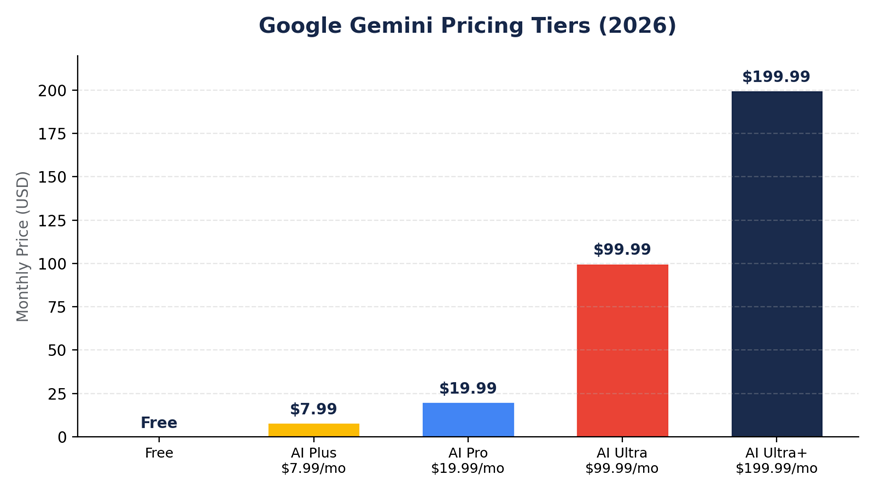
| Plan | Price | What You Get |
| Free | $0 | Gemini 3 Flash, limited flagship-model access, basic image generation, Canvas, extensions, web search. |
| Google AI Plus | $7.99/mo | Budget entry point once free-tier limits are outgrown. |
| Google AI Pro | $19.99/mo | Full flagship reasoning model, Deep Research, Veo video generation, larger Google One storage. |
| Google AI Ultra | $99.99/mo | Developer-oriented tier with roughly 5x Pro’s usage. |
| Google AI Ultra+ | $199.99/mo | ~20x Pro’s limits, Deep Think access, maximum storage. |
Choose AI Pro for large-dataset analysis (up to 2M tokens) and deep Gmail/Docs integration. Choose AI Plus for everyday convenience without needing 2TB of storage. Choose Business Standard if freelancing or leading a small team, for pooled storage and centralized billing.
Gemini vs. ChatGPT
| Category | Gemini | ChatGPT |
| Pricing | $19.99/mo Pro tier, bundled with several TB of Google One storage. | Plus tier at the same $19.99/mo price point, without bundled cloud storage. |
| Research | Deep Research is tightly connected to personal Gmail, Calendar, and Drive data (if permitted). | Has its own research tool, but less wired into personal data by design. |
| Custom Assistants | Gems and Super Gems, with a smaller shared/community ecosystem. | Custom GPTs with a larger public GPT Store library. |
| Everyday Integration | Built into Android, Gmail, Docs, Search, cars, and smart speakers. | Excellent as a standalone tool, not embedded across an OS or hardware ecosystem. |
| Raw Performance | Trades benchmark leads with ChatGPT depending on task and week. | Trades benchmark leads with Gemini depending on task and week. |
Google Gemini Pros and Cons
No AI tool is perfect, so here’s a balanced look at Gemini.
Pros of Google Gemini
Excellent Google Workspace Integration
Gmail, Docs, Drive, Sheets, and Slides integration can make Gemini extremely useful for people already using Google’s ecosystem.
Easy to Use
The interface is straightforward and accessible even for beginners.
Strong Multimodal Capabilities
Gemini can work with text, images, documents, spreadsheets, and video.
Useful Research Features
Web search and Deep Research can help users gather and organize information more efficiently.
Strong Free Option
The free version provides enough functionality for many everyday users to try Gemini without immediately paying.
Useful Creative Tools
Image and video generation expand Gemini beyond traditional chatbot functionality.
Cons of Google Gemini
It Can Still Hallucinate
Gemini can occasionally provide incorrect or misleading information, particularly with complex or niche topics.
Inconsistent Long Conversations
It can sometimes lose context or change direction during longer conversations.
Customization Could Be Better
Some users may find Gemini less flexible than competing AI assistants when it comes to customization.
Advanced Features Require Paid Plans
Some of the more powerful features and higher usage limits are restricted to paid tiers.
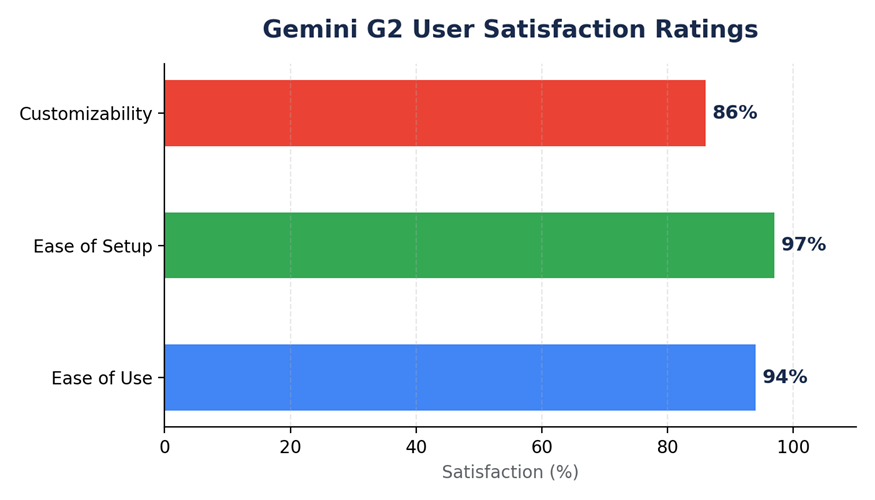
What G2 Users Say About Gemini
My personal experience is only one perspective, so I also looked at user feedback on G2.
The positive feedback generally supports Gemini’s strengths in everyday productivity and Google Workspace integration.
Users particularly appreciate its ability to work with Gmail, Docs, Drive, and other Google services.
G2 feedback also points to ease of use as one of Gemini’s strengths.
At the same time, reliability remains a recurring concern.
Users report that Gemini can sometimes provide generic answers, lose context, or produce inaccurate information.
This is important because AI performance isn’t always consistent.
The lesson is simple: Gemini is a powerful assistant, but it still requires human judgment.
Google Gemini Pricing in 2026
Google’s pricing structure can be confusing because Gemini is connected to Google AI and Google One services.
According to the information in this review’s source data, the current structure includes several levels.
Free
The free tier provides access to Gemini for everyday tasks, including chat, web search, and basic AI capabilities.
For casual users, the free version can be enough.
Google AI Plus
The Plus tier is positioned as a lower-cost paid option for users who need more capabilities than the free tier provides.
Google AI Pro
The Pro plan is aimed at heavier users who want access to more advanced models and features such as Deep Research, increased limits, and additional Google services.
Google AI Ultra
Ultra is designed for power users who need substantially higher usage limits and access to Google’s most advanced AI capabilities.
Important Pricing Note
AI pricing changes quickly.
Google can change subscription prices, features, limits, credits, and model access without much notice.
Therefore, don’t choose a plan based solely on an old review.
Always check Google’s current pricing page before subscribing.
Is the Free Version of Gemini Good Enough?
For many people, yes.
If you mainly need AI for:
- Quick questions
- Everyday writing
- Brainstorming
- Simple research
- Summarization
- Basic image generation
the free version can be perfectly adequate.
However, heavy users may eventually run into usage limits.
If you’re regularly working with large documents, complex reasoning tasks, advanced image or video generation, or other demanding workflows, a paid plan may make more sense.
Google Gemini vs ChatGPT
This is probably the comparison most people want to see.
The answer isn’t as simple as saying one is always better.
Google Gemini Wins at Integration
If you spend your day inside:
- Gmail
- Google Docs
- Google Drive
- Google Sheets
- Android
Gemini has a major advantage because it is deeply connected to Google’s ecosystem.
ChatGPT Has a Strong Assistant Ecosystem
ChatGPT offers a large ecosystem of custom assistants and a strong standalone AI experience.
If you don’t rely heavily on Google’s services, this can make ChatGPT a more attractive option.
Research
Gemini’s Deep Research and connection to Google’s information ecosystem make it a strong research option.
However, ChatGPT also has powerful research capabilities.
The best choice depends on your workflow.
Coding
Both Gemini and ChatGPT can be useful for coding.
For developers, the best choice may depend on the programming environment, model performance, and the type of code you’re working with.
The Bottom Line
If you’re deeply invested in Google’s ecosystem, Gemini is arguably the more convenient everyday AI assistant.
If you want a strong standalone AI assistant with a broad custom-assistant ecosystem, ChatGPT remains highly competitive.
Who Should Use Google Gemini?
Gemini is particularly useful for:
Google Workspace Users
If you regularly use Gmail, Docs, Sheets, Slides, and Drive, Gemini can reduce repetitive work.
Students
Students can use Gemini for explanations, summaries, brainstorming, and research.
Writers and Content Creators
Gemini can help with outlines, drafts, editing, research, and visual content.
Developers
Developers can use Gemini for coding, debugging, prototyping, and development assistance.
Small Business Owners
Business owners can use Gemini for emails, documents, research, spreadsheets, marketing content, and visuals.
Everyday Users
Even casual users can benefit from Gemini for questions, planning, summarization, and creative tasks.
Who Should Consider Another AI Tool?
Gemini may not be the perfect choice if:
- You rarely use Google services.
- You need highly specialized customization.
- Your main priority is a specific coding workflow.
- You need consistently perfect answers without fact-checking.
- You prefer another AI assistant’s writing style.
The best AI tool depends on your actual workflow rather than a generic “best AI” ranking.
Is Google Gemini Worth It in 2026?
After using Gemini across writing, research, coding, image generation, data analysis, and mobile tasks, I don’t think of it as simply another chatbot.
Its biggest advantage is integration.
Google isn’t just offering an AI model inside a chat window. It is increasingly putting AI across the products and devices people already use.
That changes the value proposition.
Imagine being able to:
- Rewrite a paragraph directly in Google Docs.
- Summarize an email thread.
- Analyze a spreadsheet.
- Research a complicated topic.
- Generate a presentation image.
- Ask questions about something your phone camera sees.
Those individual features may not sound revolutionary.
Together, however, they can save a meaningful amount of time.
Frequently Asked Questions
Is Google Gemini free?
Yes. Gemini offers a free experience with access to several AI capabilities. The exact models, limits, and features available to free users can change over time.
Is Gemini better than ChatGPT?
Not universally.
Gemini has a major advantage if you use Google services heavily. ChatGPT may be more attractive if you want a powerful standalone AI assistant and a larger custom-assistant ecosystem.
Is Google Gemini safe to use?
Gemini can be useful for everyday tasks, but you should still be careful about sharing sensitive information.
AI systems can make mistakes, so important information should be independently verified.
Is Gemini good for writing?
Yes. Gemini is useful for drafting, editing, summarizing, emails, blog content, and other writing tasks.
Its Google Docs and Gmail integration can make it particularly convenient for professionals.
Is Gemini good for coding?
Yes. Gemini can help with code generation, debugging, explanations, and prototyping.
Developers can also use Gemini Code Assist in supported development environments.
Is Gemini good for image generation?
Gemini is a strong option for rapid image generation and experimentation.
It can create and edit different types of visuals, although specialized design tools may still provide more control for professional production work.
Is Gemini good for research?
Yes. Gemini’s web search and Deep Research features make it useful for gathering and organizing information.
However, always verify important facts because AI-generated research can still contain errors.
Should I pay for Gemini?
For casual users, the free version may be enough.
A paid plan becomes more attractive if you use Gemini heavily or need advanced models, higher limits, Deep Research, image/video generation, or deeper Google integration.
What is Gemini Advanced?
Gemini Advanced was the older branding for Google’s paid Gemini experience. Google’s AI subscription structure has evolved, so users should check the current plan names rather than relying on older articles.
What is the biggest advantage of Gemini?
The biggest advantage is Google ecosystem integration.
If Gmail, Docs, Drive, Sheets, Android, and other Google services are already central to your workflow, Gemini can become much more useful than a standalone chatbot.
Final Verdict: Is Google Gemini Worth Using in 2026?
Yes—especially if you already use Google’s ecosystem.
The gap between Gemini, ChatGPT, and other leading AI models has become much smaller for everyday tasks.
The real difference is no longer simply about which AI model is “smarter.”
It’s about which AI fits your workflow best.
Gemini stands out because it can connect AI assistance with Google’s ecosystem.
For casual users, the free version is worth trying.
For professionals who live inside Gmail, Docs, Drive, and other Google services, Gemini can provide a meaningful productivity boost.
For developers, writers, researchers, students, marketers, and creators, its growing collection of multimodal tools also makes it a versatile option.
That said, Gemini isn’t perfect. It can still hallucinate, occasionally lose context, and produce generic responses. Advanced features can also come with usage limits or paid subscriptions.
So my verdict is:
Google Gemini is not automatically the best AI chatbot for everyone—but in 2026, it is one of the most useful AI platforms for people who already live inside the Google ecosystem.
If that’s you, the free version is worth trying before you decide whether you need a paid plan.
Pingback: Social Media Account Security: 10 Ways to Protect Yourself From Hackers -